
Dead By Deadlight Hacks — Dead By Deadlight hacks hero banner on Windows PC

Object ESP too cluttered

Object ESP is way too cluttered — every pallet and chest shows. How do I filter it down to gens, hooks, and totems?

ESP

gen_rusher OP
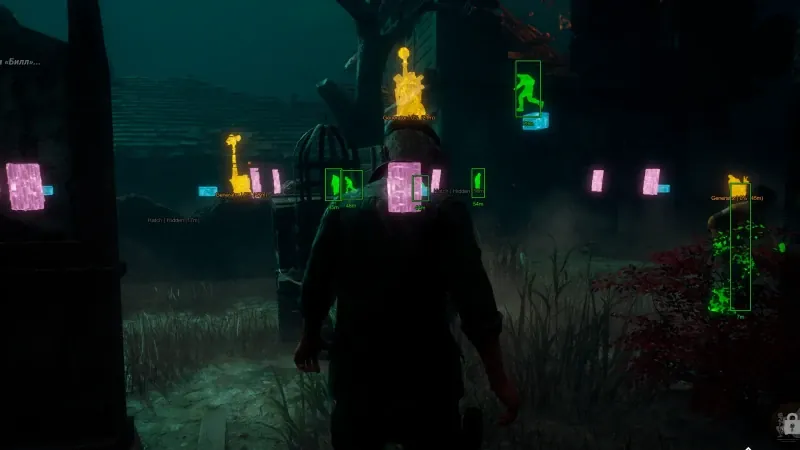
Filtered object ESP for generators and hooks in Dead By Deadlight

My object ESP is on but it is too cluttered — every pallet, chest, and window shows up. Mid-chase I cannot see generators or hooks clearly.

How do you filter this down so only gens, hooks, totems, and exits show? There must be category toggles somewhere.

8 Replies

  1. stream_fog

    Turn off pallets and chests first — I only run generators, hooks, totems, hatch, and exits. Instantly readable mid-chase.

  2. hex_main

    Also set a draw distance so far junk does not clutter the screen. Category toggles are under object ESP.

  3. dbdhack_staff Staff ✓ Solution

    Enable generators, hooks, totems, hatch, and exits separately. Turn off pallets, windows, and chests if the screen is busy. Add a draw distance so distant objects do not clutter. Full option list is on Features.

  4. gen_rusher OP

    Where are the category toggles — under object ESP?

  5. stream_fog

    Yeah, object ESP section. I keep gens and hooks on, totems on for hex builds, everything else off unless I am learning a new map.

  6. object_esp_fan

    Save it as a preset so you do not redo it every session. I keep one for survivor and one for killer.

  7. gen_rusher OP

    Gens, hooks, and totems only plus a preset fixed it. Chases are so much cleaner now, thanks.

  8. hex_main

    On tight maps like Midwich I shorten draw distance too — anything past 30m is noise in there.

This thread is closed. Replies were disabled after the discussion wrapped up. For account or license questions, contact Support.

Related threads